
Free Plugin Showdown, Email Notifications & Event Forms That Convert
How Fluent Forms Free Beats Other Plugins (+ event forms that actually work)

Welcome to Fluent Insider Weekly,
This week’s issue is all about making smarter choices. We’re comparing Fluent Forms Free against every major freemium plugin so you can stop second-guessing your decision. Plus, you’ll learn how to send flawless email notifications, create sponsorship forms that actually secure funding, build event registration forms that fill seats, and discover why 12 alternatives are replacing Google Forms in 2025.
Fluent Forms Free vs Other Freemium Plugins: The Honest Comparison
Let’s cut through the noise. You’ve got Contact Form 7, WPForms, Ninja Forms, Formidable, Forminator, and Everest Forms all claiming to be the best free option. Meanwhile, you’re stuck wondering which one actually delivers without forcing you to upgrade.
This isn’t a sales pitch. It’s an experience-driven comparison covering UX, drag-and-drop functionality, AI form builders, integrations, payment options, and what you actually get for free versus what’s locked behind paywalls.
Contact Form 7 is text-heavy and coder-friendly with no drag-and-drop. WPForms has smooth drag-and-drop but limited fields. Ninja Forms looks great but locks most fields behind premium. Formidable and Forminator sit somewhere in between. Everest Forms is simple but lacks AI and conditional logic.
Where does Fluent Forms Free land? Read the full breakdown and decide for yourself.
Want the full scoop? Read → “Fluent Forms Free vs Other Freemium Form Plugins: Choose the Best”
How to Send Email Notifications to Your WordPress Users (Without Them Landing in Spam)
Sending email notifications sounds simple until nothing arrives. Or everything lands in spam. Or your shared hosting server silently fails to deliver half your messages.
Here’s the reality: WordPress’s default email system isn’t reliable. You need proper SMTP configuration, a trusted email service provider, and a form plugin that makes notification setup effortless.
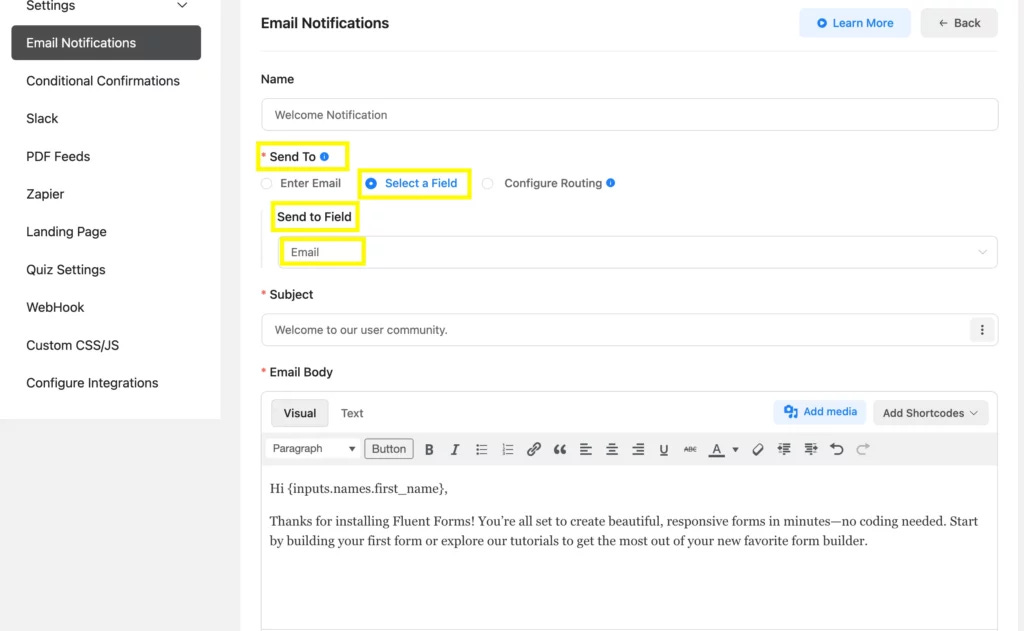
This guide shows you how to fix WordPress email issues, configure Fluent SMTP (free) for bulletproof deliverability, and set up automated notifications using Fluent Forms. Plus, we’ll cover personalization tactics like welcome emails, file attachments for lead magnets, and conditional logic that sends different messages based on user responses.
Stop losing leads because emails never arrived.
Want the full scoop? Read → “How to Send Email Notifications to Your WordPress Users“
Create a Sponsorship Form That Actually Secures Funding
Still managing sponsorship requests through endless email threads? That’s not just inefficient, it makes your organization look unprofessional.
Sponsors are busy. They evaluate dozens of opportunities. When your process feels disorganized, they question whether their investment will be managed properly.
A dedicated sponsorship form changes everything. It’s formal, streamlined, and instantly establishes credibility. Collect contact info, company details, sponsor logos, and messages in one place. Use selectable sponsorship tiers with clear pricing and benefits (Gold – $5,000 includes booth, logo placement, stage mention). Accept payments directly through Stripe or PayPal.
This guide walks you through building a sponsorship form in WordPress using Fluent Forms, including payment integration and automated tracking through project management tools.
Want the full scoop? Read → “How to Create a Sponsorship Form in WordPress: A Step-by-Step Guide“
Build Event Registration Forms That Fill Seats Fast
Organizing workshops, webinars, or conferences means collecting attendee information efficiently. The faster people can register, the more seats you fill.
Event registration forms simplify pre-event tasks by gathering everything you need upfront: contact details, dietary preferences, session choices, payment information. Add hCAPTCHA to prevent spam. Enable submission notifications. Use multi-step forms for longer registrations to reduce abandonment.
This tutorial shows you how to create professional event registration forms in WordPress using Fluent Forms. Drag and drop fields, customize labels and placeholders, validate phone numbers, prevent empty submissions, and embed forms anywhere on your site with a simple shortcode.
Want the full scoop? Read → “How to Create an Event Registration Form in WordPress“
12 Best Google Forms Alternatives in 2025: When Simple Isn’t Enough Anymore
Google Forms is free and simple. That’s why everyone starts there. But here’s what you lose: design control, branding, payment acceptance, advanced analytics, and workflow automation.
When you’re running a business or scaling a team, those limitations become dealbreakers. You need tools built for growth, not just quick surveys.
This guide compares 12 strong alternatives tested firsthand. SaaS options like Typeform, Jotform, and Paperform offer polished templates and integrations. WordPress plugins like Fluent Forms, Formidable, and Ninja Forms give complete control and data ownership. Business-focused tools like Zoho Forms, Formstack, and HubSpot Forms connect directly to CRMs and automation pipelines.
Your best choice depends on your workflow: quick SaaS convenience or long-term WordPress control. This isn’t a generic roundup; it’s advice from someone who’s tested them all.
Want the full scoop? Read → “12 Best Google Forms Alternatives in 2025“
VIDEO: The All-New Reports Dashboard in Fluent Forms | Full Walkthrough
New Integration Page Alert → Google Drive, Dropbox, Amazon S3, Cloudflare R2 → Explore!
Ready to Grow with Fluent Forms?
Let’s turn these insights into action! Compare freemium plugins and confirm you made the right choice, master email notifications that actually reach inboxes, create sponsorship forms that secure funding, build event registration forms that convert visitors into attendees, or explore Google Forms alternatives built for serious growth.
Got a question or a success story? Drop it in the comments. We’re excited to connect!
Stay tuned for more insights!